US$4.99 once at launch · No subscription · macOS 14+
₹499 in India. Local prices and taxes appear in the App Store.
Mac App Store release in preparation · Not available to purchase yet
Native Mac app Your files are processed locallyApple silicon & Intel
YOUR FILES, IN GOOD COMPANYMeet your calmer workspace ↙
Findermax 1.0 · Actual app · Fictional demonstration files
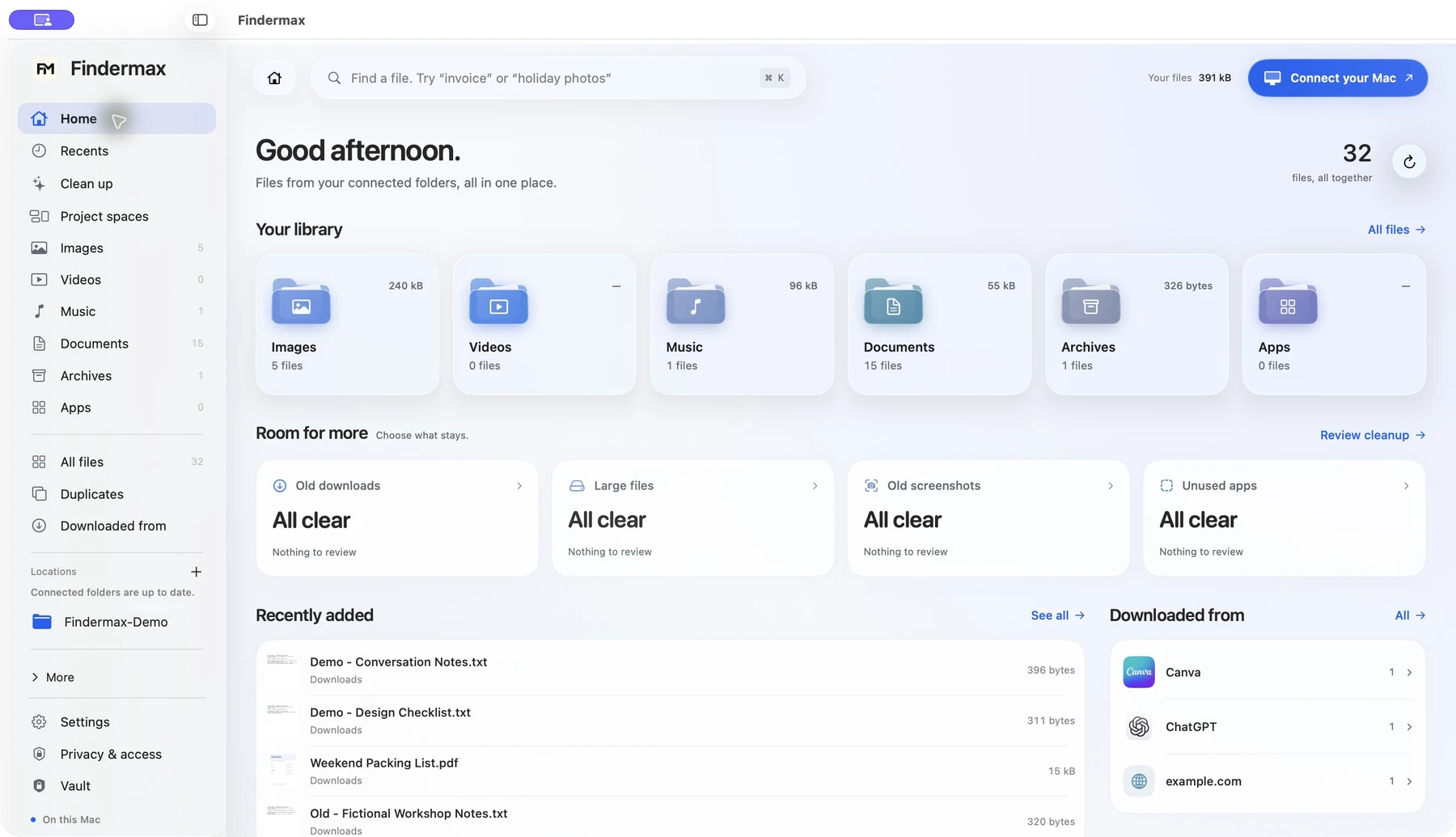
Find your everyday files Bring projects together Review before cleanup Keep encrypted copies
LESS DIGGING. MORE FINDING.
A place for the things you’re looking for.
The document you need. The project in progress. A little room for whatever comes next.
Findermax 1.0 · Actual app · Fictional demonstration files
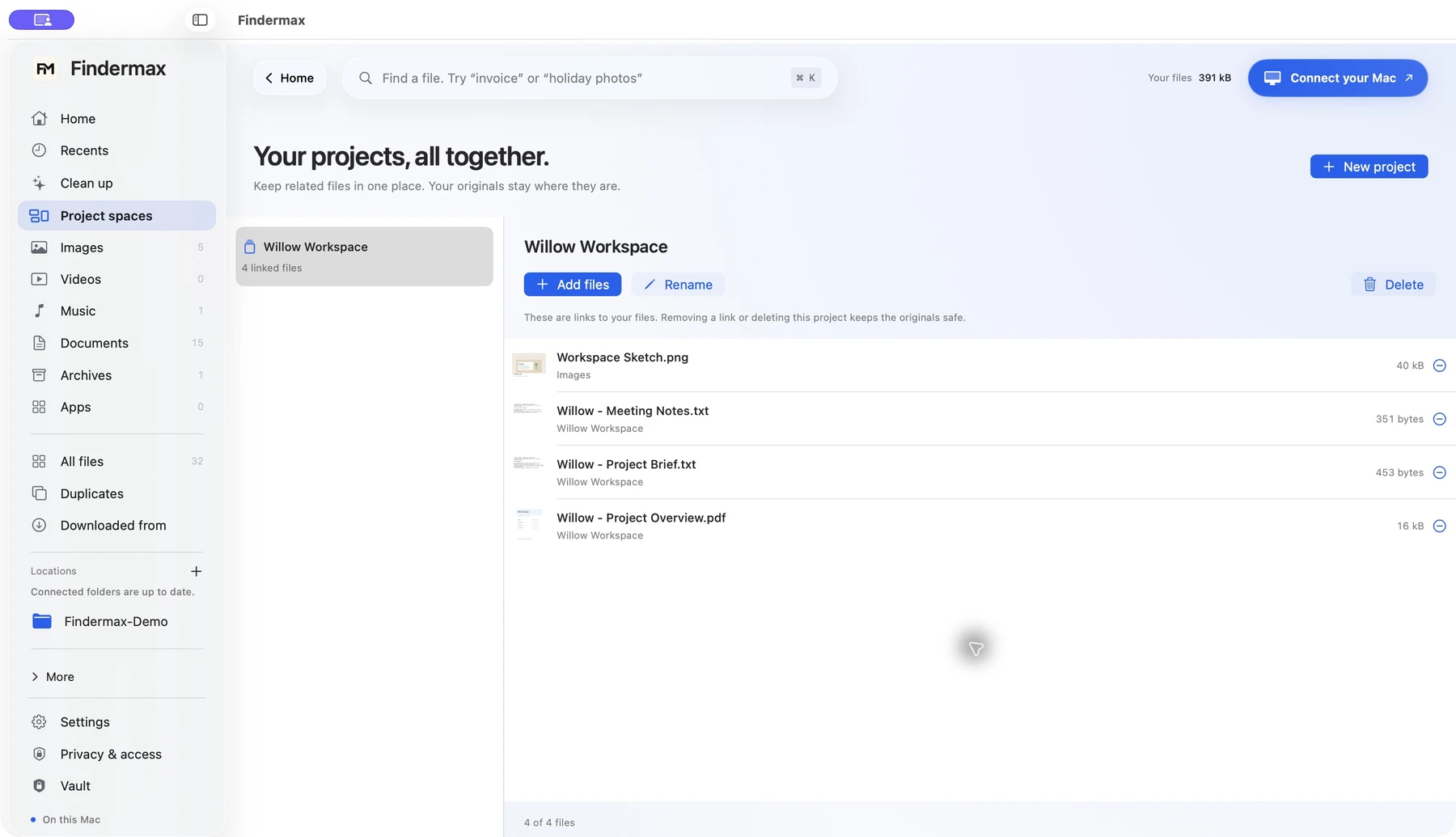
Collect links to the brief, the images, and the final PDF in a project. Every original stays where it belongs.
Explore Findermax with a demonstration library. No files on your Mac are accessed by this website.
SMALL MOMENTS. A LITTLE EASIER.
Organize files on your Mac. Keep projects in view.
YOUR MAC FILE ORGANIZER
Your project files. Together in one space.
The brief is in Documents. The images are in Downloads. Bring links to them together in one project space, ready for the next time you sit down.
Collect links to indexed files
Add, rename, and remove project spaces
Keep every original exactly where it is
A collection of links. A lot less back-and-forth.
Findermax 1.0 · Actual app · Fictional demonstration files
FIND YOUR EVERYDAY FILES
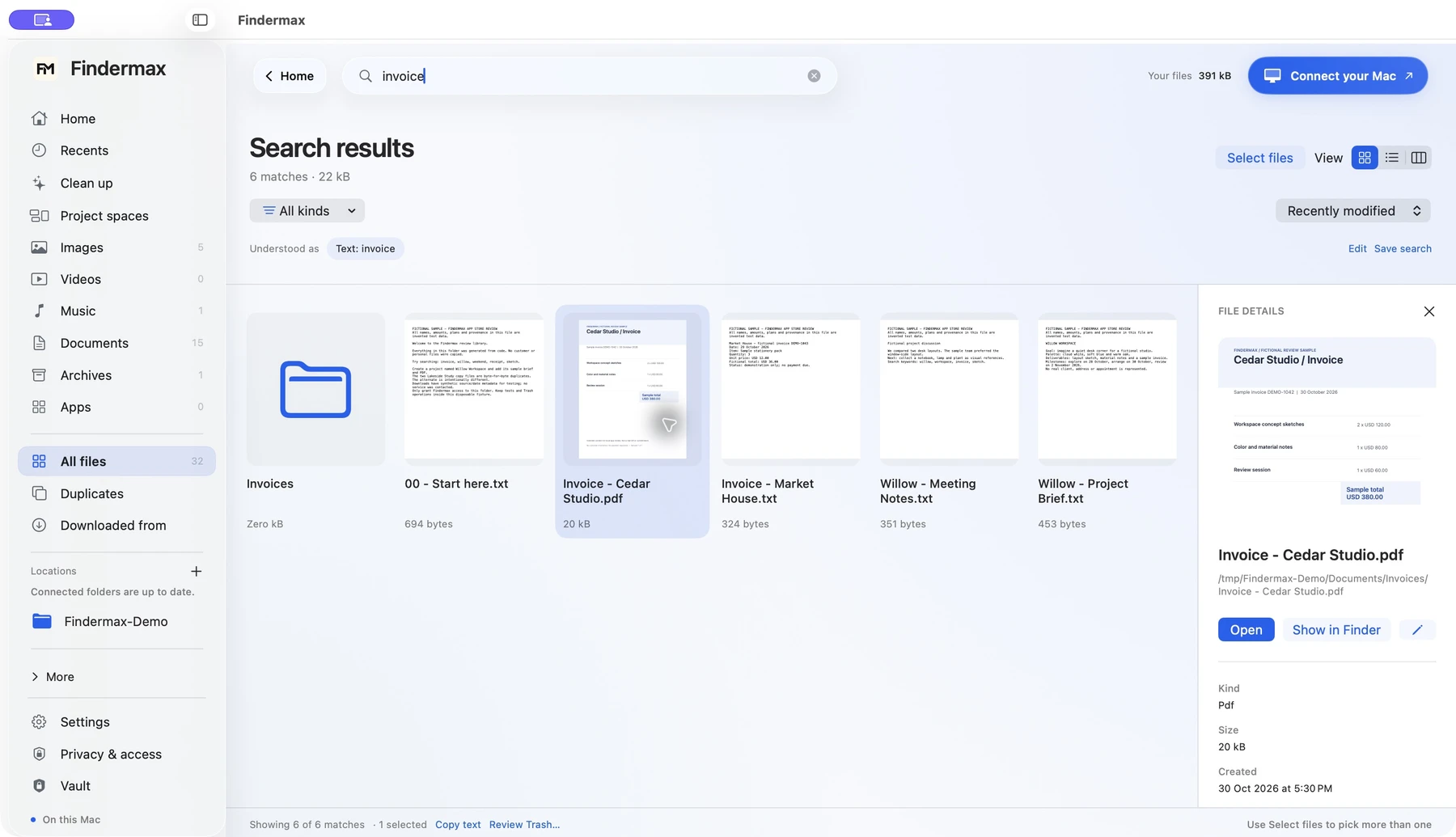
Find the file. Skip the folder hunt.
The resume before an application. The invoice you saved last month. Search the name you remember—or the words inside a supported file.
Search filenames and supported document text
Find words in images with local OCR
Try “pdfs from last week” for visible search filters
Your connected folders. One searchable library.
Findermax 1.0 · Actual app · Fictional demonstration files
A LITTLE CONTEXT GOES A LONG WAY
Remember where it came from.
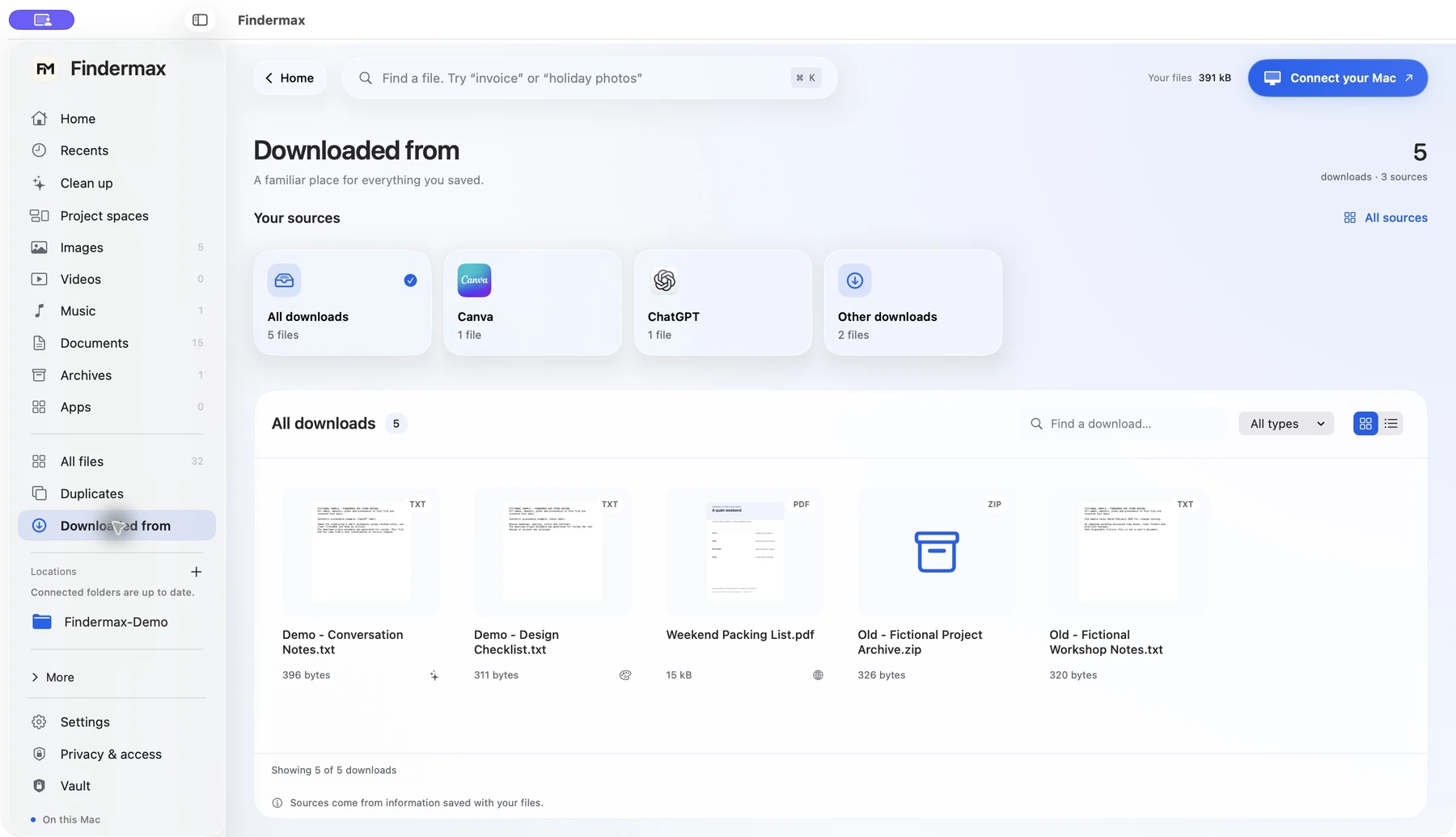
That Canva export. The image from Instagram. A file from ChatGPT. Browse your downloads by their saved source, with previews that make the right one easier to spot.
Source cards with familiar names and icons
A thumbnail grid or a compact list
Search and file-type filters in the same view
Uses source information saved with a file when available. No account connections needed.
Findermax 1.0 · Actual app · Fictional demonstration files
Take a closer look.
Native previews and an inspector, with grid, list, and parent-folder column layouts.
A fresh look at repeats.
Find identical files, or review similar photos separately. You choose what to keep.
Keep a useful search.
Save the searches you come back to, so the next visit starts one step ahead.
FINDERMAX CLEANUP
Meet Cleanup.
A lighter library. On your terms.
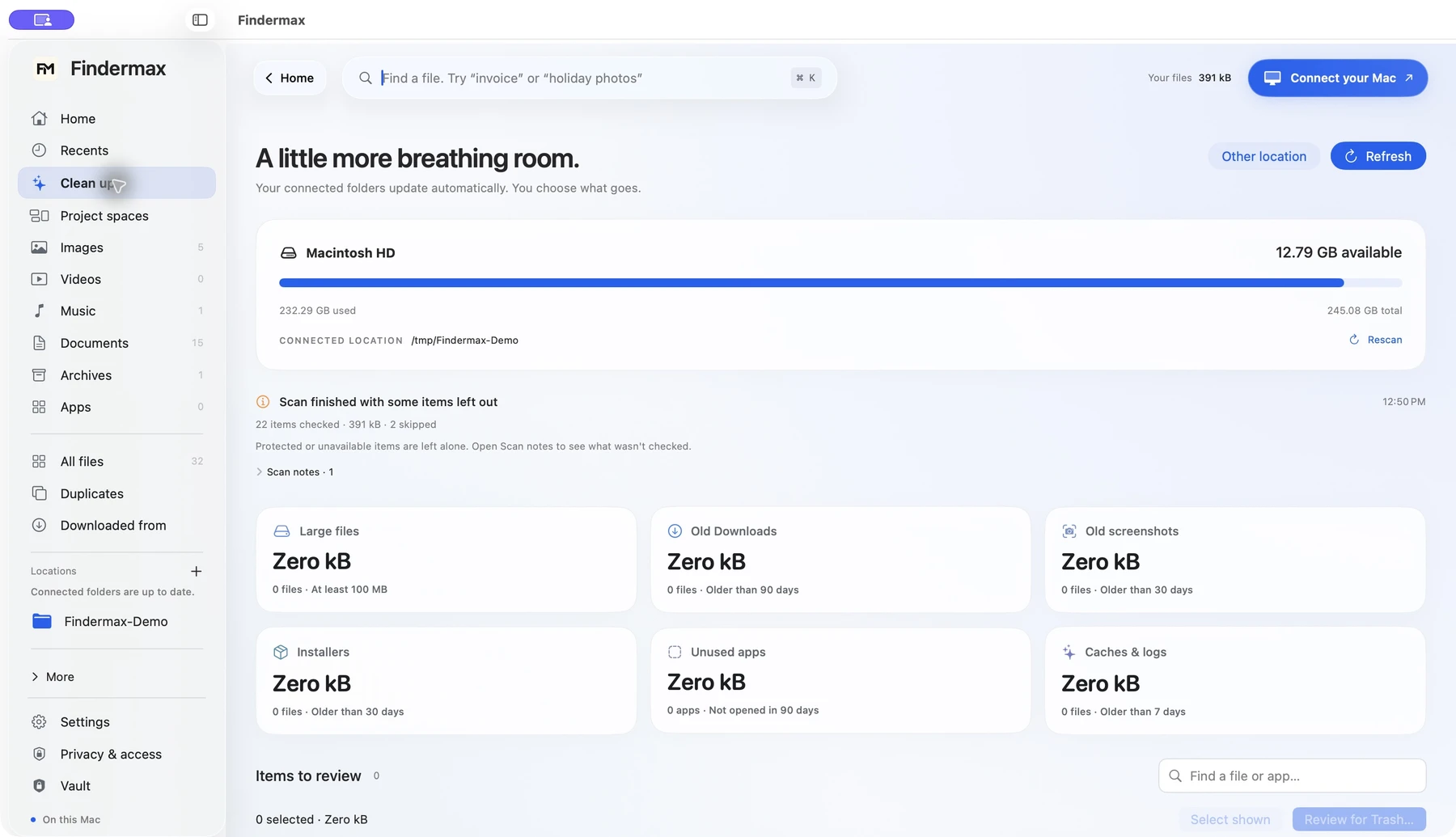
Old downloads. Forgotten installers. Files that got a little too big. Findermax gathers the candidates, so you can see what’s worth keeping—and what you’re ready to let go.
Findermax 1.0 · Actual app · Fictional demonstration files
01
See what’s there.
Large files, old downloads, installers, screenshots, and selected caches or logs. Review app suggestions, too.
02
Give it a second look.
Review the actual file paths and make your selection. Keep anything you still need.
03
You make the call.
Confirm Move to Trash when you’re ready. Nothing is deleted automatically.
Exact duplicates are matched by file contents. Similar photos have a separate review, with no automatic selection. Available candidates depend on the folders you connect.
FINDERMAX VAULT
A private place. Built in.
For your files. For your eyes.
Some documents deserve their own space. Keep encrypted copies of sensitive files in your Vault, protected by a password you choose. Even their filenames are encrypted.
01
Choose your password.
Set up your Vault with a password. Keep it somewhere safe—it can’t be recovered if forgotten.
02
Keep a private copy.
Import regular files to create encrypted Vault copies. For a folder, use a suitable archive first.
03
Lock it. Leave it.
Lock your Vault when you’re done. Unlock with your password to export decrypted copies when needed.
Vault protects its copies and filenames. Original files and exported copies stay outside Vault protection. It does not lock originals in Finder or encrypt the normal search index.
A SIMPLE START
Connect once. Keep your folders in view.
A little setup. A clearer everyday.
01
Make it yours.
Get Findermax from the Mac App Store when it launches. No separate license key.
02
Choose your folders.
Connect the locations you want through the macOS folder picker.
03
Find your bearings.
Browse and search while indexing progresses. Your library grows as files are indexed.
The same approved folders feed your library and cleanup. Protected locations may need additional macOS permission.
FOR THE EVERYDAY
Life happens. Files follow.
A few familiar moments that feel better with Findermax.
01
The application is due today.
Find Resume.pdf before the opportunity moves on.
02
“Can you send that invoice?”
Search “invoice” in supported local documents.
03
A client project, in pieces.
Bring Brief.pdf, images, and notes into a project without moving originals.
04
Downloads could use a reset.
Review old downloads and installers before sending your choices to Trash.
05
A document you’d rather keep private.
Keep an encrypted copy in Vault, then lock it.
PICK YOUR KIND OF CALM
Three looks. All you.
Clean and clear. Softly colored. Quietly dark. Try Minimal, Lilac, and Midnight below.
Findermax 1.0 · Actual app · Fictional demonstration files
A little less, in all the right places.
Calm blue, warm white, and a clear view of what matters.
Website preview only. Choose your app’s appearance in Findermax settings.
CLEAR ABOUT YOUR CONTROL
Your files. Your say.
Useful tools should be clear about what they can—and can’t—access.
Processed on your Mac.
File processing happens locally. Your files, search index and Vault contents stay on your Mac.
Access starts with your choice.
You approve the folders. You review cleanup. You confirm what moves to Trash.
Encryption, where it’s promised.
Vault encrypts its copies and filenames. The ordinary local search index is not application-encrypted.
No account. No external activation.
The local library, search, cleanup and Vault work offline. No account or external activation is required.
YOUR FILE DAY, SIDE BY SIDE
Finder, or Findermax?
One place to find files, review clutter, and keep private copies. Here’s how it compares.
Findermax compared with Finder and other built-in Mac tools
THE EVERYDAY TASK
FindermaxA little more together
Finder& built-in Mac tools
Seeing your library
Images, documents, videos and more, grouped in one Home view.
—Browse folders, Recents, tags and Smart Folders.
Searching in everyday words
Type “pdfs from last week” to set filters you can see and change.
—Use keywords and file attributes; save searches as Smart Folders.
Text inside images
Search indexed image text, and copy text from selected files together.
—Search image text in Spotlight; copy it with Live Text in Preview.
Where a download came from
Browse source cards for Canva, ChatGPT and more, when source details are saved.
—Open a file’s Get Info panel to inspect its available details.
Duplicates & similar photos
Find identical files, plus a separate review for look-alike photos. You pick what stays.
—Inspect files in Finder. Photos finds duplicates within its own library.
Making room
Cleanup cards for clutter. Review the files, then confirm Move to Trash.
—Review files in Finder, or open Storage in System Settings.
Keeping a project together
Add file links to a project space. Originals stay in their folders.
—Organize with folders, tags, aliases and saved searches.
A place for private copies
A built-in Vault encrypts imported copies and their filenames with your password.
—Create an encrypted disk image using Disk Utility.
Findermax works with the folders you connect. The right column includes other built-in Mac tools where they help.
A few helpful details +
Based on Findermax 1.0, build 4. English search phrases cover file type, size, saved source and modification date. Text search and copying use supported, indexed content. Download sources depend on metadata saved with each file. Similar-photo review is limited to 1,200 eligible images and 50,000 comparisons per scan; you make every selection. Vault protects its copies; originals and exports remain outside it.
No subscription to keep track of. Just a better place to start looking.
Native Mac app · macOS 14+
Findermax is a separate Mac App Store edition of Zuno. It has its own purchase and local app data. Existing Zuno licenses, indexes and Vaults do not transfer automatically.
Findermax for MacONE-TIME
$4.99USD one-time
All the essentials, together.
File library & supported content search
Project spaces & saved searches
Reviewed cleanup, duplicates & similar photos
Encrypted Vault copies & three themes
Coming to the Mac App Store
Planned Mac App Store release · ₹499 in India No subscription or in-app purchases. Local app features work offline.
A FEW THINGS TO KNOW
Good questions. Clear answers.
Does Findermax get access to my whole Mac?
No. You approve folders through macOS. Protected locations, disconnected drives and cloud-only files may remain unavailable. You can remove connected folders in Privacy & access.
What can I search?
Filenames, metadata, supported UTF-8 text, PDF text layers and text recognized in supported images. Coverage depends on format, local availability and extraction limits. This is local text search with defined filters; it is not conversational or semantic AI. Scanned-PDF OCR is not supported.
Does Findermax rearrange or delete my files?
Browsing and project links do not move originals. File actions require your choice and confirmation. Cleanup moves eligible selected files to Trash and does not empty it. Always review exact paths and keep backups.
Does it connect to my online accounts?
No. A saved source label is metadata already attached to a local file. It does not connect to Canva, ChatGPT or other accounts, and does not download cloud files.
Is it available for iPhone or iPad?
Findermax is a macOS app. The planned App Store release is for Mac only, requiring macOS 14 or later.
Can I buy it now?
Not yet. Findermax is being prepared for App Review and public release. There is no checkout or preorder on this website. The official Mac App Store link will be added after release.
Does Findermax need internet or an account?+
The local file library, search, cleanup and Vault work offline. There is no Findermax account or external activation. Apple handles purchasing, downloads and updates through the Mac App Store.